Viewing the status of your Asset Store submissions
After you submit your package to the AssetAny media or data that can be used in your game or Project. An asset may come from a file created outside of Unity, such as a 3D model, an audio file or an image. You can also create some asset types in Unity, such as an Animator Controller, an Audio Mixer or a Render Texture. More info
See in Glossary Store, the package is no longer in Draft status, but is now Pending Review.
To see the publishing status of your Asset:
Open the Asset Store Publisher portal and navigate to the Packages tab.
-
Select Pending Review from the Package Status drop-down menu.
You can see a list of packages waiting for approval under the Packages pending review list.
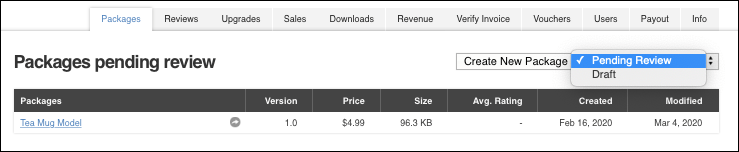
The Package Status drop-down menu is to the right of the Create New Package button Note: Wait at least one month after you submit your package for review before contacting the Support desk.
If your package is accepted, you can add tags to the package to improve its discoverability. For more information, see Adding tags to published packages.