Muting tracks
Mute a track to disable its clips and their effect on the SceneA Scene contains the environments and menus of your game. Think of each unique Scene file as a unique level. In each Scene, you place your environments, obstacles, and decorations, essentially designing and building your game in pieces. More info
See in Glossary.
You can also use mute when your TimelineGeneric term within Unity that refers to all features, windows, editors, and components related to creating, modifying, or reusing cut-scenes, cinematics, and game-play sequences. More info
See in Glossary instance includes many tracks with animations and you want to focus on the animation of one or a few tracks. The Mute icon identifies a muted track.
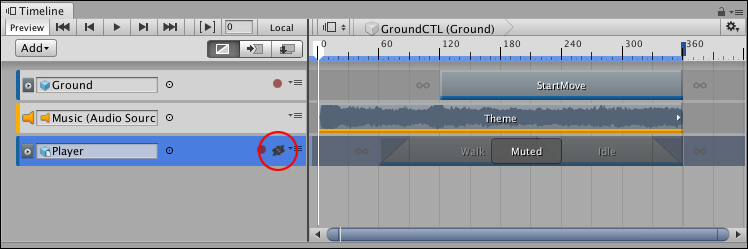
To mute a track, right-click on the track and select Mute from the context menu. You can also select a track and press M. You can select and mute multiple tracks at a time. A track can be both muted and locked.
To unmute a track, click the Mute icon. You can also select a muted track and press M, or right-click and select Unmute.
Note: Muted tracks can be deleted.
- 2019–08–20 Page published